 PBXDom
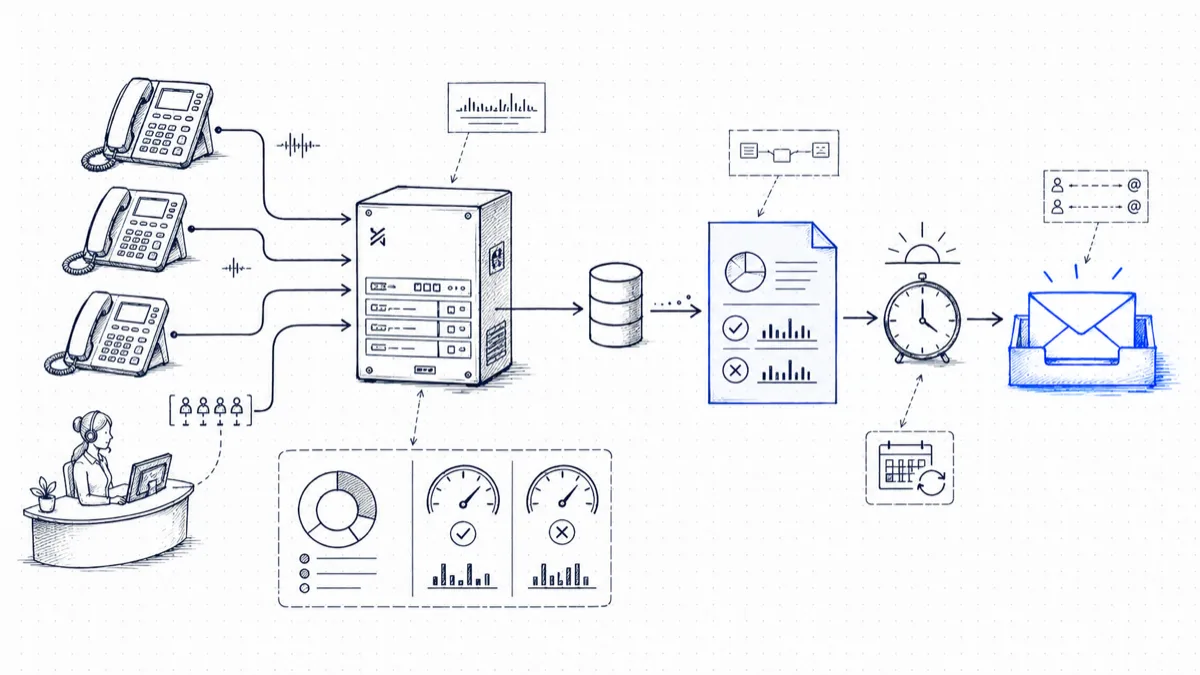
Current 3CX releases can schedule native call reports. Before building another reporting system, check whether the included call logs, queue, agent, ring-group, or extension reports already answer the daily question. When they do, schedule the native report and keep the workflow inside 3CX.
Use a separate CDR-based digest when the business needs a custom one-screen summary, the same definition across multiple phone systems, longer normalized history, or PBXDom dashboards and alerts alongside the email.
Option 1: Schedule the native 3CX report
The current official 3CX workflow is:
- Open the 3CX Web Client and go to Admin Console > Reports.
- Choose the report and apply its date, call-type, queue, group, or extension filters.
- Select Save/Schedule.
- Name the report and choose its delivery frequency.
- Confirm the schedule and recipient.
3CX says scheduled reports for one user are aggregated into one email and include a report link plus a CSV attachment. Available reports and access depend on the installed release, license, and user role, so use the official 3CX call-reporting guide for the current list.
Native scheduling is usually the best fit when:
- the report already contains the required measures;
- recipients have the appropriate 3CX role and access;
- one 3CX deployment is in scope;
- its filters, delivery, and retention meet the operational requirement.
Option 2: Build a focused daily digest from CDR
3CX also produces Call Detail Records that can be written to files or sent over a TCP socket. A CDR-based workflow can transform completed-call records into a report designed around one operational decision.
A useful daily digest normally contains:
- Call totals: external inbound, external outbound, and internal calls.
- Answer rate: answered external inbound calls divided by offered external inbound calls, with the missed count shown separately.
- Missed-call detail: time, caller, destination, and final extension or group when those fields are available.
- Peak period: the busiest hour or interval, using the organization’s chosen time zone.
- Extension or department activity: handled calls, talk time, and missed calls using one documented definition.
Keep the metric definitions visible. For example, state whether calls abandoned within a short threshold are excluded and whether repeat attempts from the same caller remain separate. A percentage without those rules cannot be compared reliably from week to week.
Getting the records from 3CX
3CX documents four CDR output formats:
- one file containing all calls;
- a separate file for each call;
- server/passive socket, where another application connects to 3CX;
- client/active socket, where 3CX connects to a receiving application.
PBXDom’s public 3CX General workflow uses the active-socket arrangement. 3CX sends completed-call records to the PBXDom collector running on an always-on Windows host. Review the 3CX dashboard connection guide for the network, field-mapping, and test-call sequence.
The official 3CX CDR documentation explains the available fields and why their selection and order matter. Useful fields include call and history identifiers, start/answer/end times, duration, termination reason, source, destination, final destination, and call chain.
Do not assume one CDR row always equals one customer call. Transfers and other call journeys can create related legs. Group them using the identifiers and call-chain data before calculating totals or answer rate.
Define the reporting window
Use the business’s reporting time zone, not whichever time zone happens to be configured on the reporting server. A typical daily run summarizes the previous local calendar day. Monday may either report Sunday alone or the complete weekend; choose one rule and label it.
Also decide:
- whether internal calls are included;
- how short abandons are treated;
- how transferred calls are grouped;
- which extension or group receives credit for an answered call;
- whether a returned call changes the missed-call follow-up list.
These definitions should remain stable unless the report is deliberately versioned and stakeholders are told about the change.
Validate before scheduling
Before sending the digest automatically:
- make answered inbound, unanswered inbound, outbound, and transferred test calls;
- compare each result with the 3CX call log;
- verify the time zone and reporting-day boundary;
- reconcile the digest totals with a native 3CX report over the same period;
- document any expected difference in call-leg grouping or abandon rules.
Only schedule delivery after the test period reconciles. A correctly delivered email can still contain incorrect totals when the field order or grouping logic is wrong.
Deliver a report people can act on
Put the primary outcome in the subject line, such as the date, answer rate, and missed count. In the body, keep the summary above the detailed table and identify who owns missed-call follow-up. Link to a dashboard or full report for investigation instead of attaching every available column.
For IT, add a separate exception view when needed—for example, no records received during business hours, unexpected after-hours activity, or a sudden change in trunk usage. Operational call performance and collection health are different questions and do not need to compete for the same headline.
Using PBXDom for the external path
PBXDom receives the configured 3CX CDR stream, normalizes the records, and supplies dashboards, searchable history, scheduled reports, and alerts. It does not replace native 3CX reports. The external path is intended for requirements such as cross-site or mixed-vendor reporting, PBXDom retention, consistent definitions, and access outside the 3CX administrative audience.
Review the 3CX reporting and analytics deployment and sample reports before choosing it. Confirm the exact 3CX release, hosting topology, CDR access, and collector network path rather than assuming that the public 3CX General profile covers every deployment.