 PBXDom
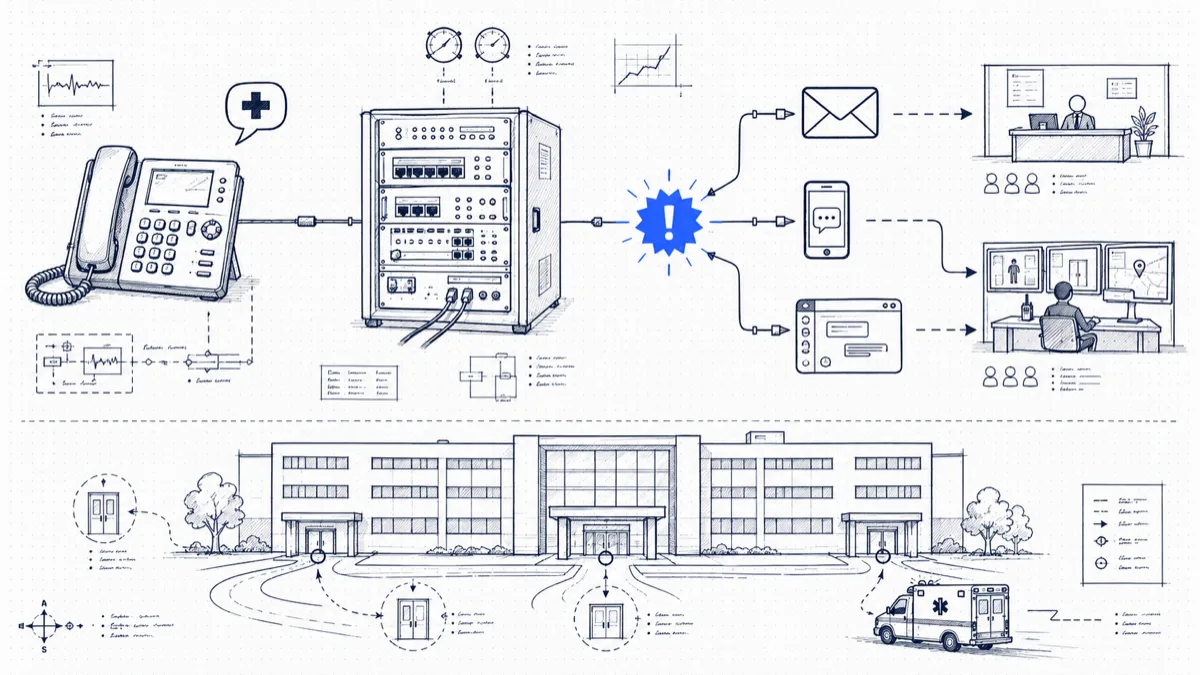
Someone on the third floor dials 911. The ambulance heads for your street address, and your street address is a 200,000-square-foot building with four entrances. The two groups who can meet the paramedics at the right door, the front desk and the security team, do not yet know the call happened.
For covered systems, U.S. rules address direct 911 dialing, notification, and dispatchable location. Notification should begin with the call where technically feasible and must not delay it. The applicable scope and technical conditions matter; review 47 CFR § 9.16 with your provider and counsel. Call-record alerts alone do not demonstrate compliance.
PBXDom can report on supported emergency-call records. Confirm record availability and timing before selecting it for an emergency-notification workflow.
Caller details to validate
A notification that says “a 911 call occurred” is close to useless. To help at the door when the ambulance pulls up, the alert must answer four questions:
- Which extension dialed, with the caller’s name from your directory if you have one.
- The extension’s physical location: building, floor, room or cubicle area. This piece takes preparation, because someone has to maintain an extension-to-location table and update it when people move desks.
- The call’s start time, so security knows whether this is happening now or happened ten minutes ago.
- A callback number for the extension, because dispatchers and on-site teams may both need to reach the caller back.
Measure both record availability and channel delivery. A completed-call record may arrive too late to meet notification requirements.
Detecting 911 calls in call records
Confirm that your exact PBX exports the needed dialed digits, originating extension, and timestamp. Configure matching against the actual number format:
911on its own9911and8911: trunk-access prefixes still configured on thousands of systems (more on these below)933where your VoIP provider offers it, so tests get flagged the same way real calls do
Some systems output records only after calls end; others batch their output. Avaya IP Office SMDR describes completed calls. Confirm the behavior of your exact model and release before relying on record-based alerts.
The PBXDom collector reads supported CDR/SMDR output. Alert content depends on received fields and configured extension information, and delivery depends on the chosen channel.
Pick notification channels people see
Choose channels that responsible staff monitor. Confirm each channel’s availability for your plan and validate delivery:
- Email: the always-on record, and not enough by itself.
- SMS: the workhorse. Send to the front desk phone, the security supervisor, and the facilities manager at the same time.
- Automated voice call: the channel that interrupts. A call that speaks “911 dialed from extension 4172, third floor east” gets attention email cannot, above all from after-hours security staff.
- Slack or Teams channel: a dedicated #emergency channel gives the whole response team one shared timeline of the event.
- Zapier or webhooks: for anything custom, such as lighting a beacon at the security desk or opening a ticket.
Skip escalation order and send to all channels at once. This is the one alert where redundancy beats tidiness.
Run a safe test
Do not test by picking up a phone and dialing 911 unannounced. Two safe options:
933. Several VoIP carriers and E911 service providers operate 933 as a test number: it answers with the calling number and the address on file, exercising your dial plan and your alerting without touching a dispatcher. Check whether your carrier supports it.
A coordinated test with your PSAP. Call your local dispatch center’s non-emergency administrative line, explain you need to validate MLTS 911 routing, and schedule a window. Dispatchers field these requests as a matter of routine and will confirm the address and callback number they see. Stay on the line and state that it is a test. Repeat the exercise after each PBX upgrade or carrier change.
A carrier test service can check only the functions it supports; it does not establish that a PSAP received the call or location. Coordinate any live 911 test in advance with the PSAP and follow its instructions.
The gaps that bite
Three problems show up over and over in real deployments:
Trunk-access prefixes. Kari’s Law mandates that plain 911 works, but decades of muscle memory mean people still dial 9-911 under stress. Configure the PBX so both complete, and detect both patterns in your alerting. A 9911 in the CDR is as real an emergency as a 911.
Remote workers on softphones. A VPN-connected softphone registered to your PBX may send its 911 call out your office trunks, presenting the office address for someone sitting at home. In 2021, with a large share of staff still remote, this is the most dangerous gap on the list. Make sure remote endpoints have their own E911 treatment, and that your alert identifies the device as remote so the front desk doesn’t search the building for someone in another city.
Stale location data. The extension-to-location table decays with each desk move it misses. Put it in the move-add-change checklist, and audit it once a quarter.
Wrapping up
Check your PBX to confirm the record output and setup requirements, then choose guided or self-setup. Validate caller details and delivery timing for your deployment. PBXDom does not configure direct 911 dialing or deliver location to the PSAP.