 PBXDom
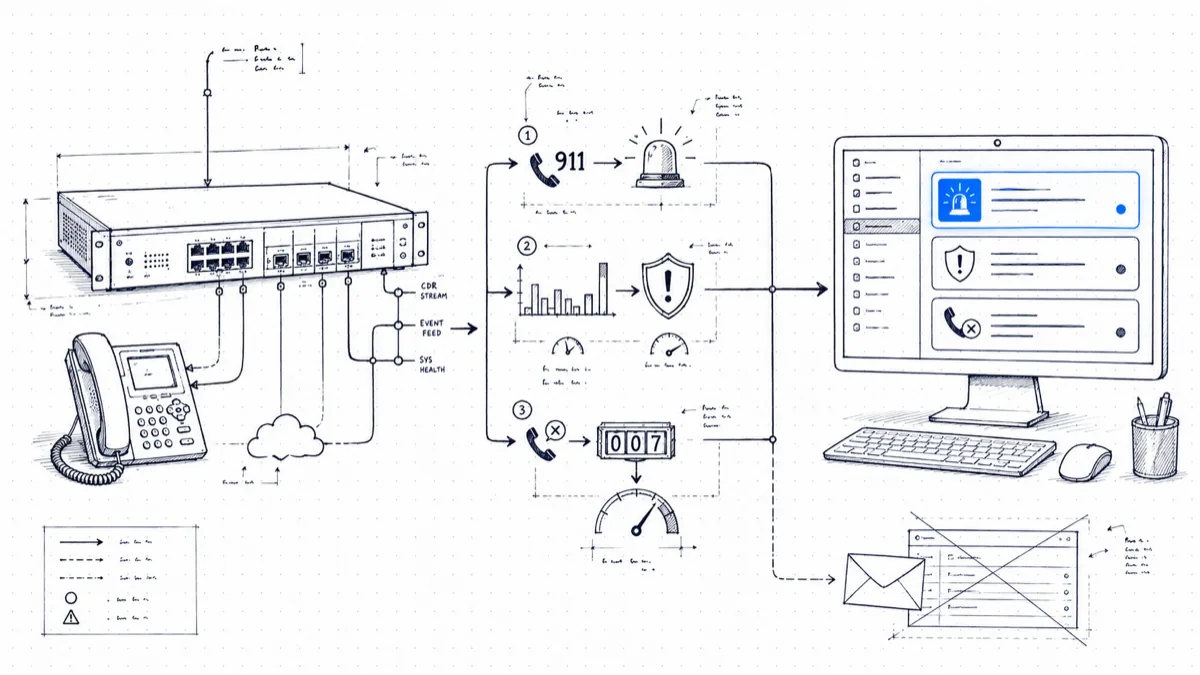
Email is where alerts go to die. A 911 call notification that lands in an inbox between a newsletter and a meeting invite has failed at its one job. If your PBX can tell you something urgent happened, the message belongs where your team spends the workday, and for most IT teams in 2025 that means Slack.
This post covers the PBX alerts that earn a place in Slack, the channel structure that keeps people reading them, and the fields each message must carry so the reader can act without logging in anywhere.
Slack beats email for urgent alerts
Three properties make the difference:
Visibility. A channel is shared state. The moment a 911 alert posts, the whole channel sees the same message. With email, you’re hoping the right individual is at their desk.
Acknowledgment. A ✅ reaction or a threaded “on it, heading to floor 3” tells the rest of the channel the alert is owned. Email offers silence or a reply-all storm, nothing in between.
Mobile push. Channel notifications reach phones in seconds, and people leave Slack push enabled because the rest of their work arrives there. You disable email push the first week you’re buried in CC threads.
Keep email as a secondary path for compliance records, and route the urgent traffic to Slack.
The three alert classes that deserve a channel
Resist the urge to wire up each alert the PBX can produce. Three classes have proven their keep.
1. Emergency calls: #emergency-911
Route emergency-call alerts to staff who can respond. Measure actual record availability and delivery timing for the specific PBX and channel.
For covered systems, U.S. rules address direct 911 dialing, notification, and dispatchable location. Notification should begin with the call where technically feasible and must not delay it. The applicable scope and technical conditions matter; review 47 CFR § 9.16 with your provider and counsel. Call-record alerts alone do not demonstrate compliance.
2. Fraud and misuse: #telecom-fraud
The patterns worth alerting on are well known: international calls after business hours, calls to premium-rate destinations, sudden bursts of short outbound calls from one extension, and traffic to countries your business has no reason to call. Membership: telecom admin, IT security, and a manager who can authorize blocking a route at 2am. Toll-fraud losses compound by the hour, so this channel should page like it means it: turn on all-message notifications instead of the default, which pings on mentions alone.
3. Operational thresholds: #phone-ops
The daytime workhorse: missed calls exceeding N this hour, queue abandon rate spiking, a trunk group hitting capacity, or the collector losing contact with the PBX. Membership: the team that staffs the phones plus their supervisor. These alerts catch a bad morning at 10:30 instead of in next month’s report.
Channel design: a noisy channel gets muted
The fastest way to ruin the setup above is one #pbx-alerts channel carrying it all. Within a month your team mutes it, and the mute takes the 911 alerts down with the missed-call noise. Rules that hold up:
- One channel per urgency class, none per alert type. Three channels fit most orgs.
- Match notification settings to urgency: all-message push for #emergency-911 and #telecom-fraud, default settings for #phone-ops.
- Tune thresholds until a channel averages a handful of messages a day at most. If #phone-ops fires twenty times a day, fix the threshold before questioning the team.
- If an alert keeps firing on a known condition, fix or suppress it within the week. Each alert your team learns to scroll past trains them to scroll past the next one.
Write messages people can act on without logging in
An alert that says “Emergency call detected” forces a login to find out where. By the time someone has authenticated, the moment has passed. Each message should carry the facts inline:
🚨 911 CALL - Main office
Extension: 4217 (Sarah K., 3rd floor east)
Time: 14:32:08
Dialed: 911
Trunk: PRI-2
The same principle applies to fraud alerts (extension, destination number and country, time, duration, estimated cost so far) and threshold alerts (current count, the threshold, the hour, which queue). Apply one test: the reader should be able to take the correct physical action (walk to the floor, call the carrier, pull someone off lunch) from the message alone. If they can’t, add fields.
Zapier as the escape hatch
Slack is the default destination, and some teams live elsewhere. If your security team works in a SIEM, your facilities team in Teams, or your on-call rotation in PagerDuty, route through Zapier: the PBX alert triggers a zap, and the zap fans out to whatever the receiving team reads. SMS and automated voice calls remain the right channel for after-hours emergencies, when the apps are closed and the phones sit on nightstands. Treat Slack as the default and route around it where a team lives somewhere else.
Test the path each quarter
Alert paths rot in the background. A Slack app token expires, a channel gets archived in a workspace cleanup, the one person in #emergency-911 who sat near the door changed jobs. Put a recurring item on the calendar: once a quarter, place a test call against each alert rule (use your 933 test service or a designated test number for the 911 path, and coordinate so the test triggers no dispatch), confirm the message arrives within the timing requirements established for your deployment, and confirm the people in the channel still work there. The habit costs fifteen minutes, four times a year, and the first failed test repays a decade of them.
Where PBXDom fits
PBXDom sends alerts based on matching records received from supported PBXs. Confirm available Slack and other notification channels for your plan, and validate the needed record fields and timing. Check your PBX before choosing guided or self-setup.