 PBXDom
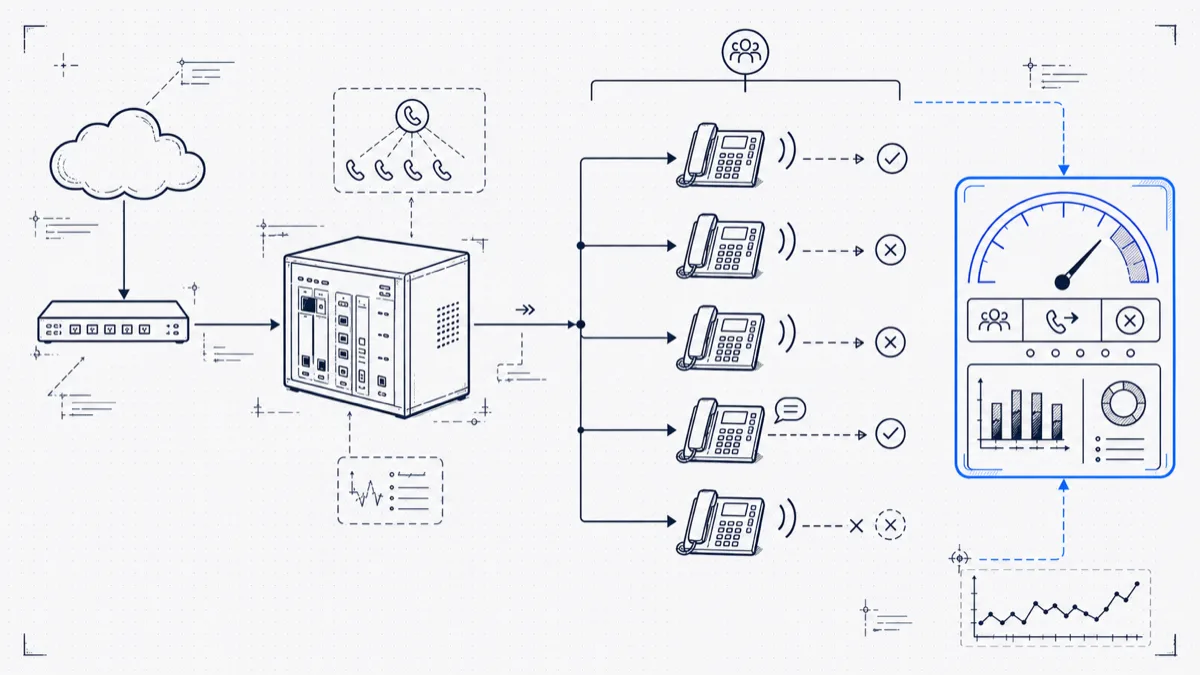
Each phone system ships this feature under its own name: Cisco calls them hunt pilots, Avaya IP Office calls them hunt groups, and 3CX, Asterisk, and FreePBX have ring groups and queues. The idea is the same: one number rings several phones so a caller reaches a person instead of a dead end.
In practice, hunt groups are where missed calls hide. The technology rings phones as designed; the failure is that you cannot see which group loses calls. A receptionist who misses a call knows it the moment it happens. A group that loses three calls over the lunch hour leaves the loss scattered across member CDRs, where each member’s individual numbers look fine.
Why raw CDR hides the problem
Pull raw call records and try to answer “how did the Support group do yesterday?” You’ll hit the same walls on each brand:
The PBX logs calls against members. Extension 214 answers a call to the Support group, and most CDR formats attribute the call to 214 with the group nowhere obvious. On Cisco, the hunt pilot survives in originalCalledPartyNumber while finalCalledPartyNumber shows the member; you have to join the two to see the group. On Avaya IP Office, the group appears in the Called Number field, while the answering member shows up as Party2 on the right segment. Sum per-extension stats and the group dissolves into its members.
Abandoned calls have no owner in the CDR. A caller who hangs up while the group rings connected to no member. Depending on the platform, that record lands against the group number, the first device that rang, or a ghost. These are the calls you need to count, and they are the easiest to lose.
Overflow chains rewrite the called party. Group A rings 20 seconds, overflows to Group B, which overflows to voicemail. Some systems log one record with the final destination; others log a segment per hop. Either way, a naive query credits Group B with a call that Group A failed to handle.
Asterisk splits the data. Queue activity lives in queue_log, outside the CDR table. Ring groups produce one CDR per rung channel on some configurations. If you’ve ever seen seven records for one inbound call, you’ve met this.
The first step in hunt group reporting is honest plumbing: resolve each inbound call to the group it rang first, then track the outcome through transfers and overflows. That is a stitching job: by call ID where the platform provides one, by trunk plus timestamp where it doesn’t.
The five numbers that matter per group
Once you have calls attributed to groups, five metrics per group, per day, and per hour cover it:
- Offered: calls that rang the group, including ones that later overflowed.
- Answered: answered by a member of this group.
- Abandoned: caller hung up while this group was responsible.
- Time to answer: track the average and the slowest 10%, because averages hide misery.
- Overflowed: calls this group pushed elsewhere. A rising overflow count means the group needs help.
A table of this shape ends arguments:
| Group | Offered | Answered | Abandoned | Avg. answer | Overflowed |
|---|---|---|---|---|---|
| Sales | 142 | 131 | 6 | 9 s | 5 |
| Support | 210 | 196 | 9 | 14 s | 5 |
| Reception | 188 | 154 | 29 | 31 s | 5 |
Reception looks staffed and answers the phone all day, yet it loses 15% of its calls. The front desk feels busy, and each receptionist’s individual stats look fine, so the loss stays invisible until you total it per group.
Finding the group that drops calls unnoticed
Daily totals are the starting point. The Reception group above answers 92% of calls across most of the day, and 61% between 12:00 and 13:00, when two of the three members are at lunch and the group runs on one phone. The daily average buries the lunch hole.
Break each group’s abandon rate out by hour of day and day of week. The same patterns recur across most offices:
- A lunch gap, most often 12:00–13:30.
- The first 30 minutes of the morning, when the group opens at 9:00 on paper but people settle in at 9:10.
- Friday afternoons, which run worse than the rest of the week.
- One member who sits in the group on paper but keeps Do Not Disturb on. On sequential hunting, each pass wastes 15 seconds ringing a phone that will not pick up, and that ring time comes straight out of the caller’s patience.
That last one deserves a check today. On sequential (linear) hunting, a dead member at the top of the list adds a full ring timeout to each call that hunts past it.
Fixing what you find
Once you can see the gaps, the fixes are cheap. Stagger lunches so the group keeps at least two live members through the midday hours. Pull DND extensions out of the group, or switch from sequential to simultaneous ring if callers wait through long hunt chains. Shorten the overflow timeout: a group that has not answered in 25 seconds is unlikely to answer in 65, and overflowing to a second group sooner converts abandons into answers. And re-check the group schedule against reality: a group that opens at 9:00 when the trunk starts ringing at 8:40 has a built-in 20-minute abandon factory.
Then re-measure the same hour-by-hour table the following week. Membership changes are free to try and free to revert; the next week’s numbers show whether they worked.
Don’t wait for the weekly report
The last piece is an alert, because a report you read Tuesday can’t save Monday’s callers. A practical threshold: more than 3 abandoned calls in any 30-minute window, per group, sent to that group’s supervisor rather than IT. The person who can fix “Reception is drowning right now” is the person who can walk over and pick up a phone. Real-time call monitoring dashboards on a wallboard do the same job without email: once the abandoned counter ticks up in plain view, the members closest to the phones pick up the pace within minutes.
PBXDom reports on supported CDR/SMDR output. Group identification, call status, and available alert conditions depend on the records your system exports. Confirm these fields during the compatibility check before choosing guided or self-setup.