 PBXDom
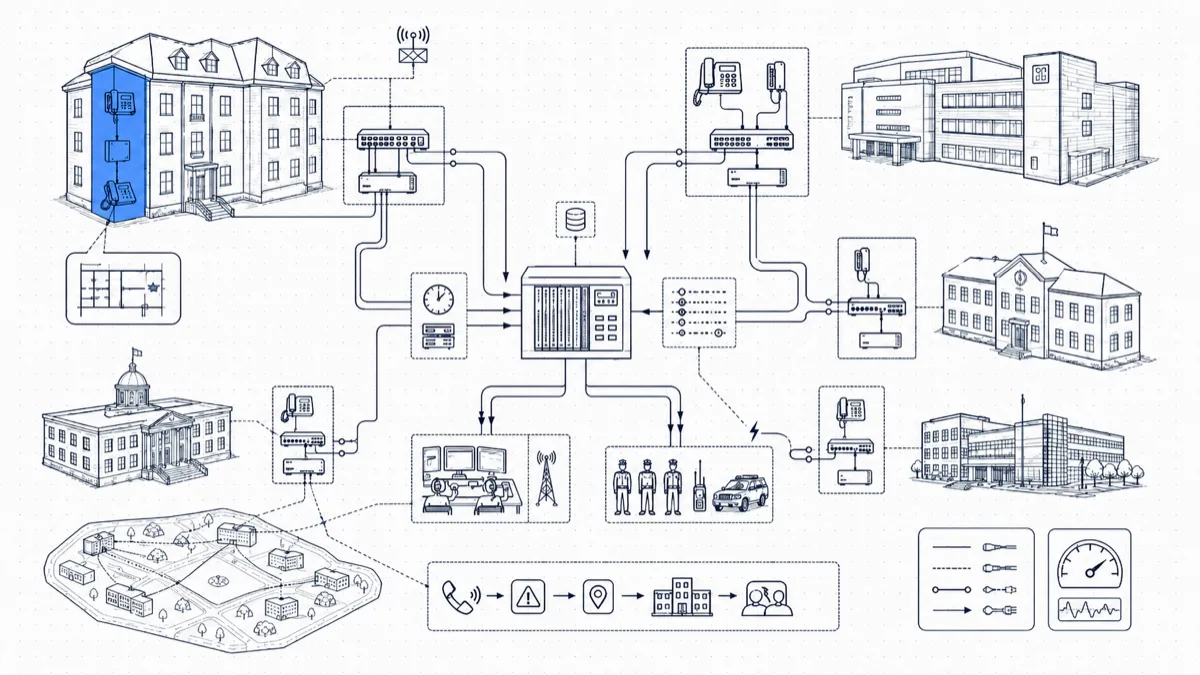
A 911 call goes out from a university residence hall at 1:40 a.m. The PSAP has it and dispatch is rolling. Your own security team, two minutes away with master keys and a defibrillator, knows nothing, because the only thing the PBX logged was “extension 4217.”
That’s the multi-building 911 problem in one sentence. Hospitals, universities, city governments, and K-12 districts all run multi-line telephone systems (MLTS) spread across buildings that may be miles apart. A 911 call from any of them sets two requirements beyond the call itself: the right on-site team has to know, and they have to know where. Both are solvable with the phone system you already own, and the second one comes down to data.
Extension 4217 is not a location
Your PBX knows which extension dialed 911, and its CDR/SMDR output records that within seconds of the call. The switch has no idea that 4217 is a wall phone in the third-floor west corridor of the Henderson Building. That mapping lives, if it lives anywhere, in a wiring spreadsheet last touched during a renovation, in the heads of two facilities staff, or nowhere at all.
Meanwhile the clock runs. On a large campus, on-site responders can often reach the caller before outside EMS clears the front gate, provided they’re moving toward a room number instead of searching a building. The minutes your team spends working out where extension 4217 sits are the minutes the alerting system exists to save.
Building the extension-to-location map
The deliverable is a table, and it doesn’t need to be fancy:
extension | building | floor | room or zone | responder note
The responder note matters more than it looks. “Rm 312W, enter via north stairwell; elevator needs a badge after 22:00” is the difference between a responder who arrives and one stuck in a lobby.
Sources to mine, in rough order of reliability:
- The PBX configuration itself: extension names and descriptions often contain partial location data.
- Patch-panel and cable records, for analog and digital sets that can’t move without a technician.
- Switch-port and DHCP records, for IP phones: the network knows which closet and port a phone is plugged into even when the spreadsheet doesn’t.
- A walk-through for whatever’s left. The full sweep is tedious, and you do it once.
Prioritize by risk: residence halls, patient floors, classrooms, and public-area phones first. The storage-room extension can wait a week.
Keeping the map current
A location map starts decaying the day you finish it, because phones move. The fix is procedural: make the location field a required step in your move/add/change process, so a technician can’t close a ticket without updating the map. Then audit each quarter. Pull 20 random extensions per campus, walk to where the map says they are, and score the result. Accuracy below about 95 percent means something upstream broke, and the audit caught it for the price of a walk.
IP phones deserve extra paranoia. An analog set is bolted to its wiring; an IP phone moves whenever someone carries it to a new office and finds a live jack. If you run a large IP estate, cross-check the map against switch-port data on a schedule rather than trusting the last ticket.
Routing alerts to the right team per building
A single campus-wide alert list fails in both directions: security drowns in events from buildings they don’t cover, and the people 200 feet from the caller hear nothing. Route by building or zone instead. A typical matrix:
- Residence halls, parking structures, grounds: campus security dispatch, around the clock.
- Administration and office buildings: front desk plus security during business hours; security only after hours.
- K-12 school buildings: front office plus the school resource officer, with district security as the escalation tier.
- Hospital and clinical buildings: the security operations center, which already runs its own response protocols.
Add an escalation rule on top: an alert with no acknowledgment within a defined window climbs to the next tier on its own, so a 2 a.m. notification can’t sit unread in an inbox.
Channels: don’t lead with email
The staff you most need to reach (officers on patrol, facilities crews, night security) carry radios and phones rather than laptops. Build the channel mix around that. SMS plus an automated voice call covers anyone mobile, and the voice call matters: a ringing phone breaks through in situations where a text sits unread. Email serves desk staff and the paper trail. Slack or Teams reaches dispatch and operations rooms that live in those tools, and a webhook or Zapier connection pushes events into your incident-management or mass-notification platform. A dedicated 911 alerting system should support all of these from the same event.
Each alert, on any channel, should carry the same payload: extension, callback number, building, floor, room or zone, the responder note, and a timestamp. The recipient should have nothing left to look up.
The compliance floor: Kari’s Law and RAY BAUM’S Act
For covered systems, U.S. rules address direct 911 dialing, notification, and dispatchable location. Notification should begin with the call where technically feasible and must not delay it. The applicable scope and technical conditions matter; review 47 CFR § 9.16 with your provider and counsel. Call-record alerts alone do not demonstrate compliance.
Review direct dialing and the required notification path for each covered deployment. Validate timing separately from received call-record history.
Verify dispatchable-location delivery with your telephone-system and emergency-service providers. An internal location mapping does not itself deliver location to a PSAP.
Use this workflow as a planning aid and have the applicable requirements reviewed for your deployment.
Drill it, and review every real event
An untested 911 alerting chain is a hypothesis. Two habits fix that.
Scheduled drills. Exercise the full chain per campus on a recurring schedule: call placed, alert fired, right recipients, right location, acknowledgment recorded. Coordinate test calls with your local PSAP or use your jurisdiction’s designated test procedure. Do not improvise live 911 tests.
A post-incident check on every real event. Each real 911 call gets a five-minute review: did the alert fire, and how fast; did the right people get it on the right channels; was the location correct; and did someone acknowledge and respond. Log the answers. A wrong room number found in review costs you a one-line correction. The same error during a cardiac arrest costs response time you can’t get back.
One event history for every campus
Sooner or later an auditor, the district’s counsel, or your own leadership will ask: show me every 911 call across all sites in the last year, and prove the notifications went out. Answering that should take one report, run in minutes. Centralize 911 events from each building into one searchable history: timestamp, extension, location at the time of the call, who received notifications on which channels, and acknowledgment times. That history is the record for compliance, the baseline for your drills, and, after a bad night, the document that protects the institution.
Wrapping up
PBXDom can collect supported call records from multiple sites and alert on matching emergency numbers. Confirm each site’s model, output timing, available fields, plan, and delivery channels. Review what notification evidence is available; record receipt does not prove recipient acknowledgment. Check your PBX before choosing guided or self-setup.