 PBXDom
Cisco Unified Communications Manager (UCM) sends call detail records to the PBXDom collector over FTP or SFTP. Use this configuration reference with your administrator; confirm the exact CUCM version and collector settings before making changes.
1. Enable call records
- In Cisco UCM Administration, open System > Service Parameters.
- Choose your UCM node in Server, then Cisco Call Manager in Service.
- Set CDR Enabled Flag to True on each server whose calls you want to log.
- Set CDR Log Calls with Zero Duration Flag to True to include calls that did not connect, then select Save.

2. Add the collector destination
From Navigation, open Cisco Unified Serviceability with an administrator account. Go to Tools > CDR Management > Add New.
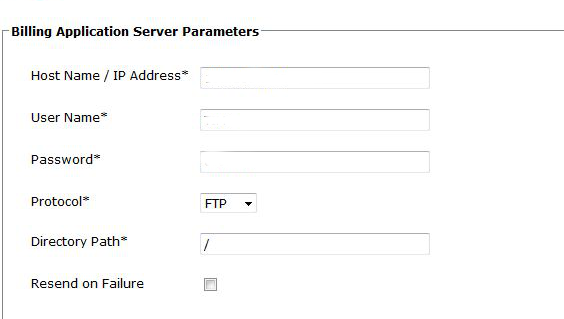
In Billing Application Server Parameters, enter:
- Host Name / IP Address: the machine running the PBXDom collector
- User Name: the transfer username configured in your collector
- Password: the matching transfer password
- Protocol: FTP or SFTP, matching your collector configuration
- Directory Path:
/ - Resend on Failure: enabled
3. Check the connection
Select Add. The UCM node checks the transfer details and writes a test file to the destination. If this fails, recheck the host, credentials, protocol, and directory before continuing.